Write your own specification
specification.yaml is the file that the Engine runs. The guided interview
writes it for you. If you already know the tests and the graders to run, write it in the manual
form in the browser, or write the YAML yourself. This page shows both ways, and lists every field
of the file.
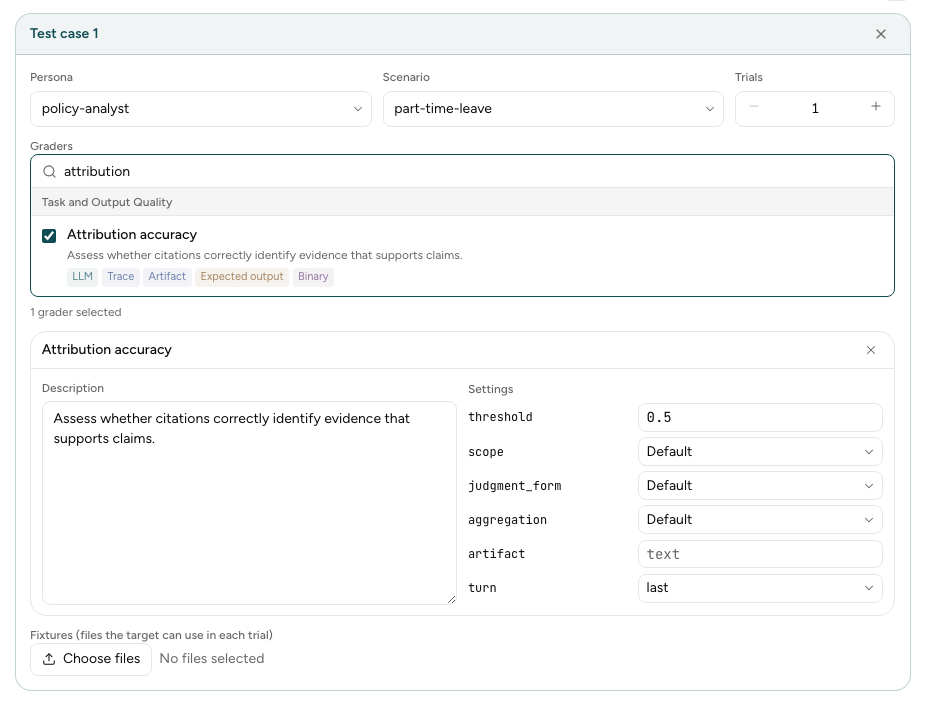
Fill in the manual form
The manual form is in the browser only. To open it, start the Wizard and select Skip the interview and write it yourself.
To connect a target, select Build Spec and connect target at the top of the form. See Target connection.
Download specification gives a ZIP file, for example 20261016-223045-manual.zip. It holds
outputs/specification.yaml, the files under outputs/fixtures/, and
outputs/target-binding.yaml when you connect a target. The form writes each Test Case as one
Task, with one Behaviour that holds a Criterion for each grader.
Write the file yourself
Make a folder with this layout:
experiments/design/research-assistant/outputs/
├── specification.yaml
├── target-binding.yaml     (only for the HTTP or browser runner)
└── fixtures/
    └── leave-policy.pdf    (the files that the Tasks send)
This specification.yaml tests one Behaviour of the research assistant with two graders:
schema_version: 1
id: research-assistant
runner_factory_ref: metis.engine.simulation.runners.http.HttpRunnerFactory
target_binding: target-binding.yaml
target:
  name: Policy research assistant
  users: Policy staff
  description: Answers questions about internal policy documents and cites the source of each answer.
features:
- id: F-1
  name: Policy research
  description: Answer policy questions from the shared policy documents.
  behaviours:
  - id: EB-1
    name: Cite a source in each answer
    description: Each answer cites the policy document that supports it.
    measured: true
    criteria:
    - id: AC-1-1
      name: Citations support the answer
      description: Each citation points to a passage that supports its claim.
      grader_fqn: metis.library.graders.AttributionAccuracyGrader
      grader_args: {}
    - id: AC-1-2
      name: Cites a source for each claim
      description: The answer cites a source for each policy claim.
      grader_fqn: metis.library.graders.CriterionJudgeGrader
      grader_args:
        threshold: 0.5
personas:
- id: policy-analyst
  name: Policy analyst
  description: A policy analyst who checks how a new rule applies to their team.
  metadata:
    role: analyst
scenarios:
- id: part-time-leave
  name: Leave for part-time staff
  description: Ask how the new leave policy applies to a part-time employee.
tasks:
- id: TC-001
  scenario_ref: part-time-leave
  persona_ref: policy-analyst
  behaviour_refs: [EB-1]
  num_trials: 3
  fixtures: [leave-policy.pdf]
Run it with metis engine run --input-dir experiments/design/research-assistant/outputs/. Before
the run starts, the Engine checks the file, the fixture names, and the settings of each grader. If
a check fails, the Engine names the error and does not start the run.
The JSON schema of the file is
packages/core/schemas/specification.schema.json.
Your editor can use it to check the file as you type.
Field reference
Top level
| Field | Required | Meaning |
|---|---|---|
schema_version | Yes | Always 1. |
id | Yes | The ID of the experiment. The Engine uses it in the name of the output folder. |
runner_factory_ref | Yes | The runner that talks to your application. See Choose the runner. |
target_binding | No | The target connection file, relative to specification.yaml. |
defaults | No | The models for the run. See Defaults. |
target | Yes | The application that you test. |
features | Yes, to run | The Features, Behaviours, and Criteria to measure. |
personas | Yes, to run | The simulated users. |
scenarios | Yes, to run | The situations to test. |
tasks | Yes, to run | The Test Cases. |
fixture_content_descriptions | No | A short description of each fixture, by file name. The Engine writes one for each fixture that has none. |
Choose the runner
| Your application | runner_factory_ref | target_binding |
|---|---|---|
| An HTTP API | metis.engine.simulation.runners.http.HttpRunnerFactory | Required |
| A web page | metis.engine.simulation.runners.browser.BrowserRunnerFactory | Required |
When runner_factory_ref is not set, it defaults to the HTTP runner. To
write a runner for your own application, see the
engine guide.
target
| Field | Required | Meaning |
|---|---|---|
name | Yes | The name of the application. |
users | Yes | Who uses the application. |
description | Yes | What the application does, in one or two sentences. |
detail | No | More context, such as rules that the application must follow. |
features, behaviours, and criteria
Each Feature holds Behaviours, and each Behaviour holds Criteria. Every item has an id, a name,
and a description.
| Field | On | Meaning |
|---|---|---|
behaviours | Feature | The Behaviours of the Feature. |
measured | Behaviour | true to measure the Behaviour. Default false. |
criteria | Behaviour | The checks for the Behaviour. |
grader_fqn | Criterion | The full Python name of the grader, for example metis.library.graders.CriterionJudgeGrader. |
grader_args | Criterion | The settings of the grader, such as threshold. {} keeps the defaults. |
The description of a Criterion is the instruction for the
criterion judge.
personas and scenarios
| Field | Required | Meaning |
|---|---|---|
id | Yes | The ID that the Tasks use. |
name | Yes | The display name. |
description | Yes | For a Persona, how the user acts. For a Scenario, the situation. |
metadata | No | Extra details as names and text values, for example role: analyst. |
tasks
| Field | Default | Meaning |
|---|---|---|
id | Required | The ID of the Test Case. |
persona_ref | Required | The id of a Persona. |
scenario_ref | Required | The id of a Scenario. |
behaviour_refs | [] | The id of each Behaviour to check. Each Behaviour supplies all its Criteria. |
num_trials | 3 | How many times to run the Test Case. |
fixtures | [] | The files to send, by name, from fixtures/. |
max_turns | 20 | The most turns in one Trial. The Trial stops at this number. |
timeout_minutes | 15 | The time limit for one Trial. |
response_wait_ms | 300000 | How long to wait for each reply, in milliseconds. |
max_run_retries | None | How many times to retry a Trial that fails to run. |
user_agent_model | None | The model of the simulated user for this Test Case. |
defaults
| Field | Meaning |
|---|---|
user_agent_model | The model of the simulated user, for every Test Case. |
judge_model | The model of every LLM judge. |
runner_agent_model | The model that drives the HTTP or browser runner. |
A field that you leave out uses the value in .env. See the
model guide.
Next step
To run the tests against your application, set up the target connection.