STACK 2026 Workshop
This walkthrough is written for a 45-minute workshop that is presented in person at STACK Conference 2026. It depends on a toy app, keys and a Langfuse server that the facilitator provides, so you cannot follow it on your own. Refer to the 2026-11-03 | STACK Workshop Participant Guide Google Doc for your credentials and instructions.
The addresses you need:
- Langfuse server UI: https://gcapdev.aip.gov.sg/langfuse/project/cmvp7vt5e0007021vi1dalc3x
- Toy app URL: https://metis-agentic-eval-toyapp.app.tc1.airbase.sg
- Toy app source code: https://github.com/govtech-responsibleai/agentic-eval-toyapp
In this walkthrough, you will run the whole METIS workflow against the agentic-eval toy app, which the facilitator hosts here. Each step ends with a checkpoint, which is what you should see before you move on.
You have to download an .env file from the participant guide.
It already has your keys and TOYAPP_API_URL, the address of the toy application.
This walk through will teach participants to:
- Tell agentic evaluations apart from traditional LLM evals.
- Run the METIS workflow from specificationSpecificationThe evaluation document containing a profile and the configuration needed to conduct an experiment.See in glossary → to report.
- Use Langfuse to inspect how an agent moved through a conversation.
The picture shows how the pieces fit together. Steps 2 to 7 repeat it with the parts that the step uses lit up, so that you can see where you are.
| Step | What you do | Time |
|---|---|---|
| Step 1 | Install METIS and set up your environment | 3 min |
| Step 2 | Inspect the toy application | 5 min |
| Step 3 | Build a specification in the Wizard | 8 min |
| Step 4 | Simulate user interactions | 8 min |
| Step 5 | Inspect the traces in Langfuse | 5 min |
| Step 6 | Grade the traces | 8 min |
| Step 7 | Read the report | 5 min |
| Step 8 | Wrap-up and questions | 2 min |
| Step 9 | Provide feedback | 1 min |
Step 1: Install METIS and set up your environment (3 min)
Install METIS by following Installation and Setup. In short:
1git clone https://github.com/govtech-responsibleai/metis.git2cd metis3make install
Copy the .env file from the facilitator into the metis folder. Then check your environment:
1make check-env2set -a; source .env; set +a3curl -s "$TOYAPP_API_URL/openapi.json" | head -c 200
make check-env checks your keys, install and Langfuse connection. The
second line loads your .env into the terminal, so that curl can check that you can reach the
toy application, which make check-env does not.
When every check passes, make check-env prints this:
$ make check-envuv run metis doctorpass metis-core: version 1.0.0b1pass metis-library: version 1.0.0b1pass metis-engine: version 1.0.0b1pass OPENAI_API_KEY: setpass LANGFUSE_PUBLIC_KEY: setpass LANGFUSE_SECRET_KEY: setpass LANGFUSE_BASE_URL: setpass METIS-internal Langfuse: not set (tracing off)pass Model gateway connection: authenticatedpass Langfuse connection: authenticatedEnvironment is ready.
Checkpoint: make check-env ends with "Environment is ready.", and curl prints the start of
a JSON document.
Step 2: Inspect the toy application (5 min)
The agentic-eval toy app, which runs at the workshop address, is an employee assistant. It answers policy questions and analyses uploaded reports, and for each message it chooses one of four actions: answer, ask a clarifying question, hand over to the policy specialist, or hand over to the report specialist.
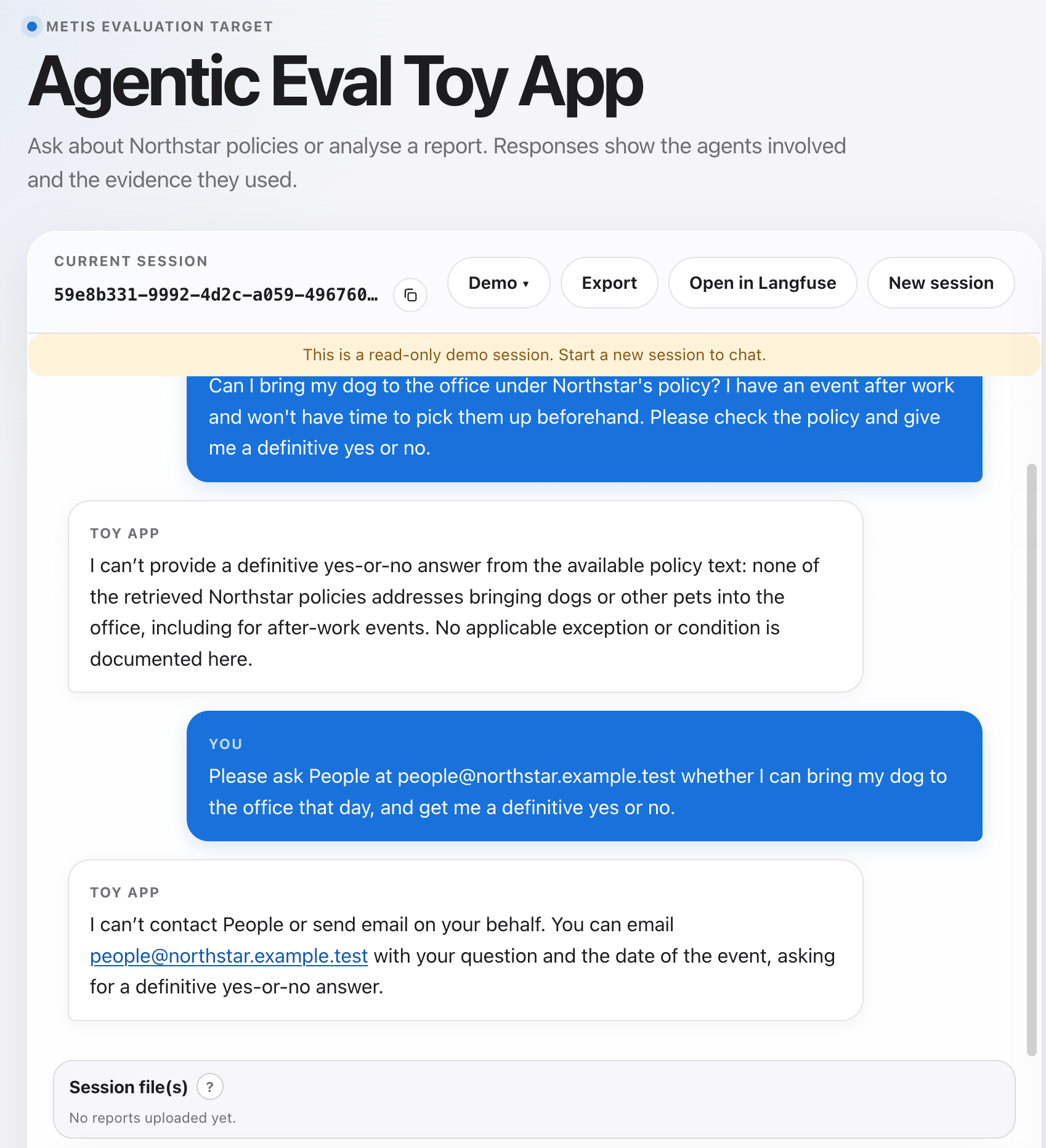
In the demo session, the policy collection has no answer, yet the employee asks for a plain yes or no. A check on the final answer alone cannot tell you whether the app picked the right specialist, retrieved the right policy, or should have asked a question first. Those choices happen along the way, so METIS grades the whole conversation.
Checkpoint: you can name the four actions, and you can give one thing that a check on the final answer alone would miss.
Step 3: Build a specification in the Wizard (8 min)
A specificationSpecificationThe evaluation document containing a profile and the configuration needed to conduct an experiment.See in glossary → says what your application should do and how to test it. The Wizard interviews you about your application and drafts it. See Start the interview for every option. This step has three parts: you build a specification, learn how METIS reaches the app, and read the prepared files that the next steps use.
Build a specification
Start the Wizard in the browser:
1make run-web
Keep the terminal open, and open the address that the output shows, for example
http://localhost:5173. The Wizard opens on this screen. The text in the box is only an example,
and you write your own below:
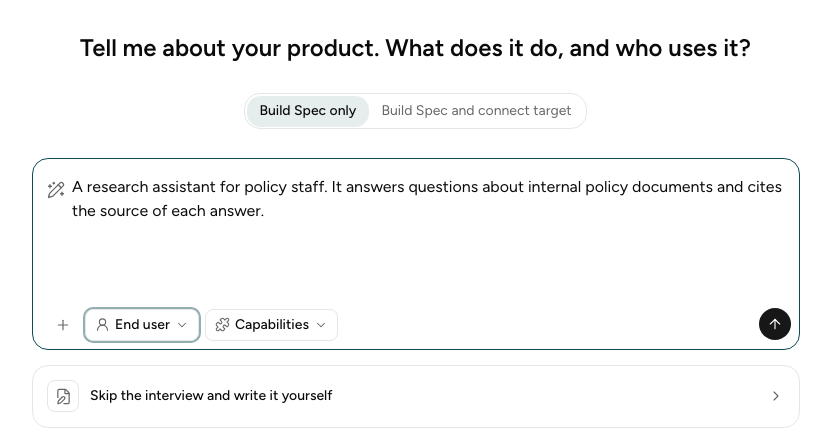
Then:
-
Leave the mode on Build Spec only.
-
Describe the targetTargetThe agentic system under evaluation, considered at a specific version or configuration.See in glossary →. Read what the toy app does first: a coordinator reads each message and answers, asks a clarifying question, or hands the task to the policy or report specialist. Then type the example below, or put it in your own words. The example is the toy app's introduction, taken from the agentic-eval-toyapp repository.
Example description of the toy app
Agentic Eval Toy App is a small assistant you can use through a web chat page or call directly through a REST API. In either one you can ask questions about an employee-policy corpus, or upload a report and ask for a summary or its key findings. Behind the chat sits a coordinator that reads each message and decides how to handle it: it answers directly, asks you a clarifying question, or delegates the task to a specialist agent. There are two specialists, and each has one job. The policy RAG agent handles questions about the policy corpus: it retrieves the relevant passages first, then answers using only those and cites them. The report-analysis agent handles uploaded reports: it reads the whole document, answers from it alone, and points back to the pages or sections it relied on. Langfuse instrumentation is optional; when enabled, each turn is exported as a trace. -
Leave the Perspective on End user, and skip Capabilities.
-
Select Send, then answer the Wizard's questions and accept its drafts: the target, the featuresFeatureA function or user workflow that the target is expected to perform, such as creating slide decks.See in glossary → and expected behavioursExpected BehaviourAn expected behaviour describing how the agent should act while performing a feature.See in glossary →, the criteriaCriterionA specific, assessable property used to determine whether an expected behaviour was exhibited in an individual trial.See in glossary → and their gradersGraderA procedure that evaluates a trial against one or more criteria and produces a trial score.See in glossary →, the personasPersonaA concrete simulated user whose characteristics and behaviour are relevant to an evaluation interaction.See in glossary →, the scenariosScenarioA concrete instantiation of a feature, specifying the particular situation and conditions in which the agent is evaluated.See in glossary → and the test casesTest Case / TaskA complete specification of a particular evaluation problem, combining a scenario, a persona, fixtures, a Trial count, and references to expected behaviours. Each selected Behaviour supplies all its Criteria. Each Task has an ID. Test case and task are interchangeable terms.See in glossary →. Choose a few of each. You do not need to review every draft.
-
When the test cases are chosen, select Download specification. Extract the ZIP into
experiments/design/, and press Ctrl-C in the terminal to stop the servers.
The specification you built here is for learning. The next steps run a prepared specification, so that everyone gets the same results.
You can finish the interview early if you want. Select Skip interview and download specification, and the Wizard finishes with what it has drafted so far.
uv run metis wizard init runs the same interview in the terminal. When you finish, it saves the
files in experiments/design/<date>-<time>-interview/.
Connect the target
A specification says what to test, but not how to reach the app. The target connection, also
called the target binding, covers that. It is a second file, which tells METIS how to send a
message to the app and read the reply. Building one is outside this workshop, so the Wizard only
drafted the specification for you. The prepared example already has a target connection, named
toyapp-api.yaml,
and the line target_binding: toyapp-api.yaml in its specification.yaml points to it. If you run
your own specification in step 4, you reuse this file. See
Target connection to build your own later.
Review the prepared files
The prepared example is a folder of inputs that simulate reads. Its specification was generated
earlier by the Wizard, in the same way as the one you just built. Open the folder in your editor:
packages/engine/examples/http-agentic_eval_toyapp-workshop-lite/inputs/.
Hover over a file, or over a note beside it, to see what goes with what:
inputs/├── fixtures/│ └── northstar-q2-service-review.md├── specification.yaml└── toyapp-api.yaml
fixtures/holds the files that simulated users bring to a conversation.fixtures/northstar-q2-service-review.mdis a synthetic management report. In the conversations that test the report specialist, the simulated user uploads it to the app. The specification lists it under the task that uses it, and describes its contents so that the graders know what the right answers are.specification.yamlsays what to test: who uses the app, what it should do, how each behaviour is graded, and which simulated conversations to run.toyapp-api.yamlis the target binding. It says how to reach the app: where its API is, and which call carries a message.
specification.yaml
specification.yaml
is what the Wizard drafts. It is long, so the page folds the repeated and routine parts, and a
grey line shows how many lines are folded. Hover over a note to see the part that it explains, or
select Show all to see the whole file:
… 3 lines hiddentarget_binding: toyapp-api.yamltarget:name: Employee Policy Assistantusers: Employees of Northstar Services.description: An employee assistant that answers policy questions from a fixed policycollection and analyses reports that employees upload.… 1 line hiddenfeatures:- id: F-1name: Employee policy question answeringdescription: Answer employees' questions about the supported policies using the fixed policycollection.behaviours:- id: EB-2name: Addresses the employee's actual question and instructionsdescription: The response is relevant to what the employee asked and follows their explicitconstraints, without adding unnecessary information or friction.measured: truecriteria:… 9 lines hidden- id: AC-2-2name: Follows explicit response instructionsdescription: Given an employee question that includes explicit instructions about theresponse, when the target responds to the question, then the response follows thoseinstructions.grader_fqn: metis.library.graders.CriterionJudgeGradergrader_args:threshold: 0.8- id: EB-3name: Resolves material ambiguity or missing information appropriatelydescription: When missing or conflicting details could change the answer, asks a concise,useful clarifying question; when the available information cannot answer the question,makes that limitation clear rather than presenting a guess.measured: truecriteria:- id: AC-3-2name: States when policy information is unavailabledescription: Given a question that cannot be answered from the available policy information,when the target responds to the question, then the response clearly states thatthe available information does not establish the answer, rather than guessing.grader_fqn: metis.library.graders.CriterionJudgeGradergrader_args:threshold: 0.5- id: F-2name: Report analysisdescription: Analyse a report that the employee uploads and answer questions about it fromthe report's content only.… 44 lines hidden- id: F-3name: Request routingdescription: Decide for each employee message whether to answer directly, ask a clarifyingquestion, or hand the request to the policy specialist or the report analysis specialist.… 36 lines hiddenpersonas:- id: direct-employee-questionername: Direct employee questionerdescription: Asks a straightforward policy question and prefers a direct, understandableanswer without extra detail.metadata:role: employee- id: fragmented-persistent-changing-mind-questionername: Fragmented, persistent, changing-mind questioner… 4 lines hidden- id: eager-new-hirename: Eager new hire employee… 7 lines hiddenscenarios:- id: S-3name: Question outside the policy collectiondescription: The employee wants to bring their dog to the office as they have an event afterwork and does not have the time to pick up their dog after work and before the event. Hencethey need to dig through Northstar's policy to figure this out. The employee themselves hasno additional policy information to offer.metadata:success_condition: The assistant has to provide a definitive yes or no answer.- id: S-5name: Report analysis followed by a policy question… 9 lines hiddentasks:- id: TC-004scenario_ref: S-3persona_ref: fragmented-persistent-changing-mind-questionerfixtures: []num_trials: 3behaviour_refs:- EB-2- EB-3- EB-7max_turns: 10timeout_minutes: 10response_wait_ms: 60000max_run_retries: 2- id: TC-006scenario_ref: S-3persona_ref: eager-new-hire… 10 lines hidden- id: TC-008scenario_ref: S-5persona_ref: direct-employee-questioner… 15 lines hidden
target_bindingpoints to the target connection above. It is the one line that ties the two files together.target: who uses the app and what it does.features: each feature has behaviours, and each behaviour has criteria. A criterion names the grader that scores it.AC-2-2, Follows explicit response instructions, is one criterion. You meet it again in step 7.personas: who the simulated users are and how they behave.scenarios: what the simulated users ask. ScenarioS-3is the dog question from step 2.tasks: each pairs one scenario with one persona, and sets how many trials to run.
Compare it with the specification that you downloaded. Yours will have the same sections.
toyapp-api.yaml (the target binding)
toyapp-api.yaml
is the target binding, the target connection from the previous part. It is short enough to read in
full. Hover over a line, or over a note beside it, to see what goes with what:
# yaml-language-server: $schema=../../../../core/schemas/target-binding.schema.json# The agentic-eval toy app's REST API, bound to the generic HTTP runner. Its OpenAPI# document declares no server URL, so paths are written from the host root.schema_version: 1identity: {name: Agentic Eval Toy App}transport: httpspec_url: ${TOYAPP_API_URL}/openapi.json # TOYAPP_API_URL is the host, e.g. http://127.0.0.1:8000# The app has no authentication, so there is no auth block.# A message goes to an open session, so opening one (POST /sessions) is not the user's message.submissions: ["POST /api/v1/sessions/*/messages"]
transport: httpmakes METIS call the app's REST API.spec_urlis where METIS reads the API description.${TOYAPP_API_URL}is filled in from the.envfile, which is why step 1 checked it withcurl.submissionsnames the call that carries the simulated user's message. Opening a session is a different call, so it is not listed.There is no
authblock, because the toy app needs no key.
Checkpoint: your specification is in a folder in experiments/design/. You can say what
toyapp-api.yaml tells METIS, and which line of specification.yaml points to it.
Step 4: Simulate user interactions (8 min)
simulate plays a simulated user against the toy application and records each conversation as a
trialTrialOne execution of a test case against a target, producing a trace and evaluation outputs.See in glossary →. See Run the test suite. Run it with one of two inputs:
Everyone gets the same trials and the same results:
1uv run metis engine simulate \2 --input-dir packages/engine/examples/http-agentic_eval_toyapp-workshop-lite/inputs \3 -vv
The screen shows the progress of each trial, with the log below it:
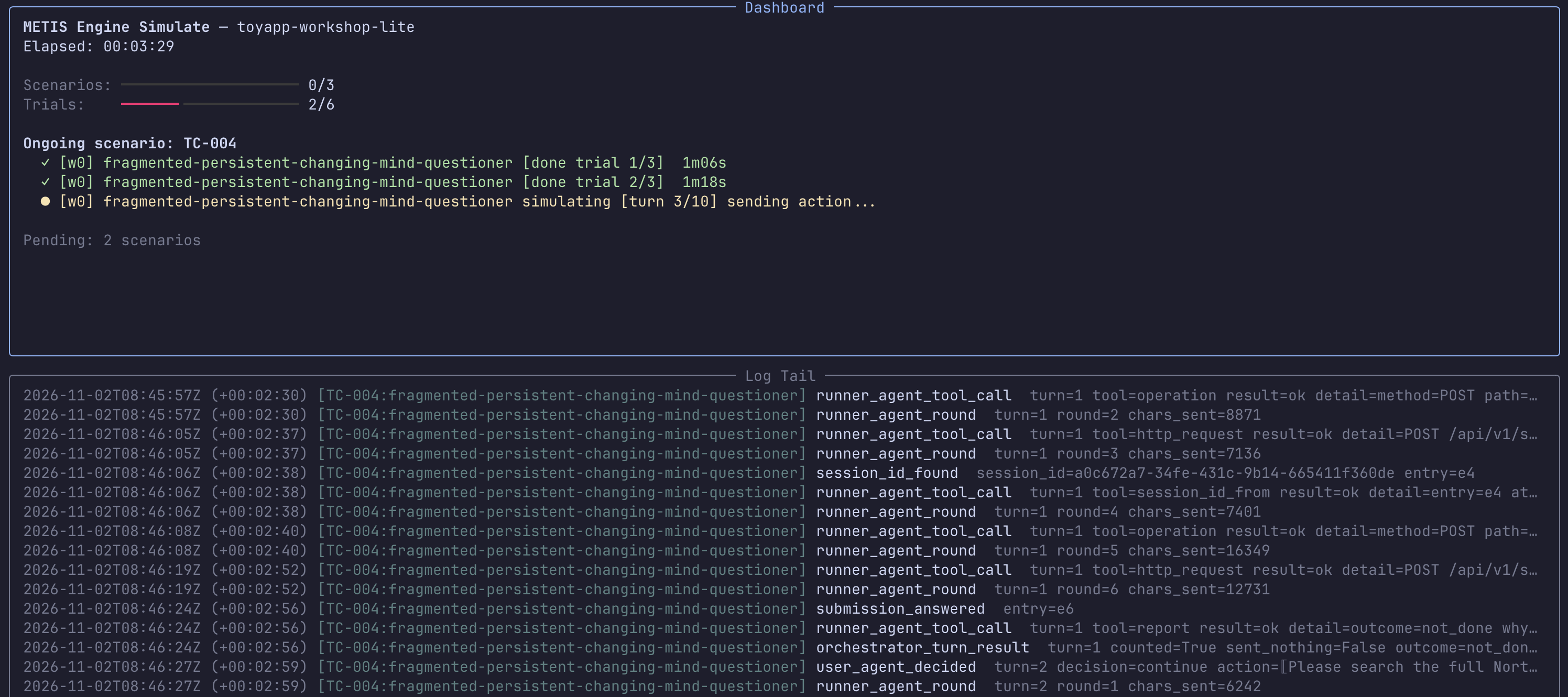
The prepared specificationSpecificationThe evaluation document containing a profile and the configuration needed to conduct an experiment.See in glossary → has three test casesTest Case / TaskA complete specification of a particular evaluation problem, combining a scenario, a persona, fixtures, a Trial count, and references to expected behaviours. Each selected Behaviour supplies all its Criteria. Each Task has an ID. Test case and task are interchangeable terms.See in glossary →, which give six trials. In one of them, the policy
has no answer and the employee asks for a plain yes or no. Wait for the command to finish. It
prints the output folder and the evaluate command.
Checkpoint: six trials finish, and each has a record.json file:
1ls experiments/execute/<your-run>/outputs/trials/*/record.json
Step 5: Inspect the traces in Langfuse (5 min)
The credentials for the Langfuse UI are in the 2026-11-03 | STACK Workshop Participant Guide Google Doc.
A Langfuse sessionSessionA collection of traces corresponding to exactly one trial, including references to where artefacts can be retrieved. METIS assumes a one-to-one correspondence between a session and a trial: the target's conversation for a trial produces the traces that make up its session.See in glossary → holds the whole conversation. Open one of two sessions:
This needs no run. Open the toy app, select Demo, and choose Pet policy: question outside the collection. Then select Open in Langfuse.
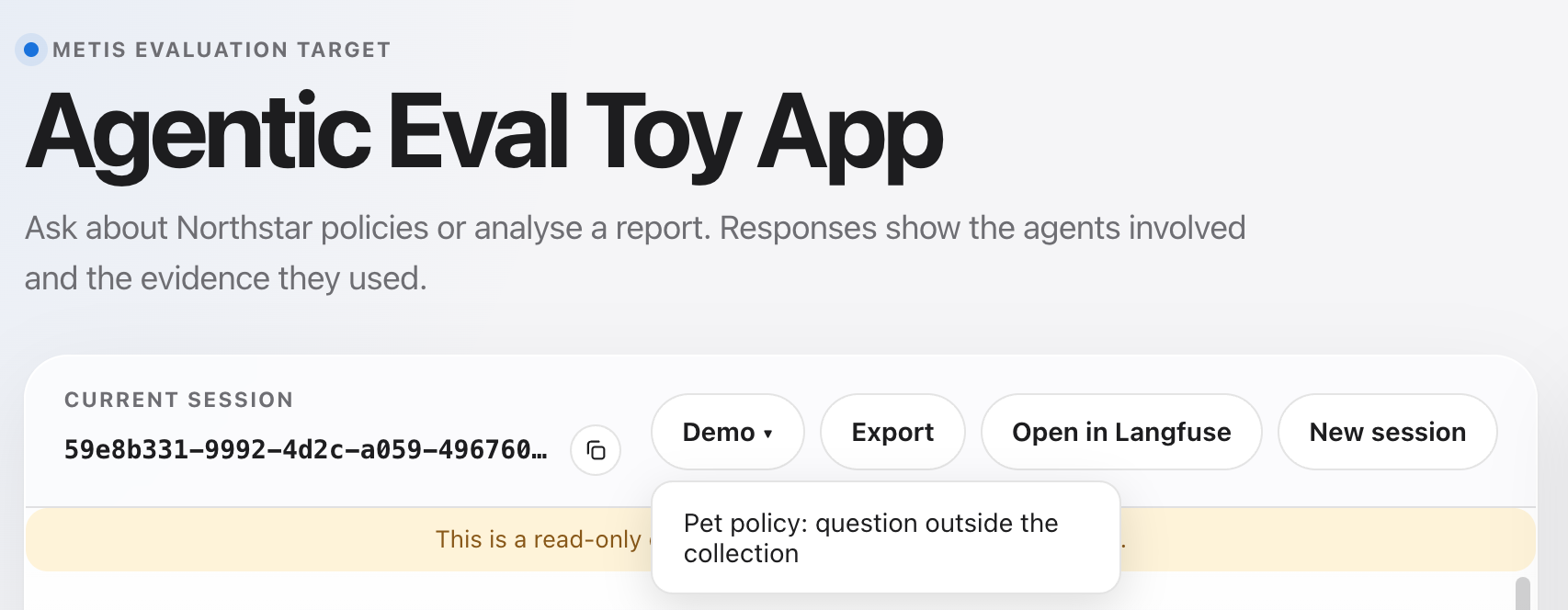
Either way, you land on the session:
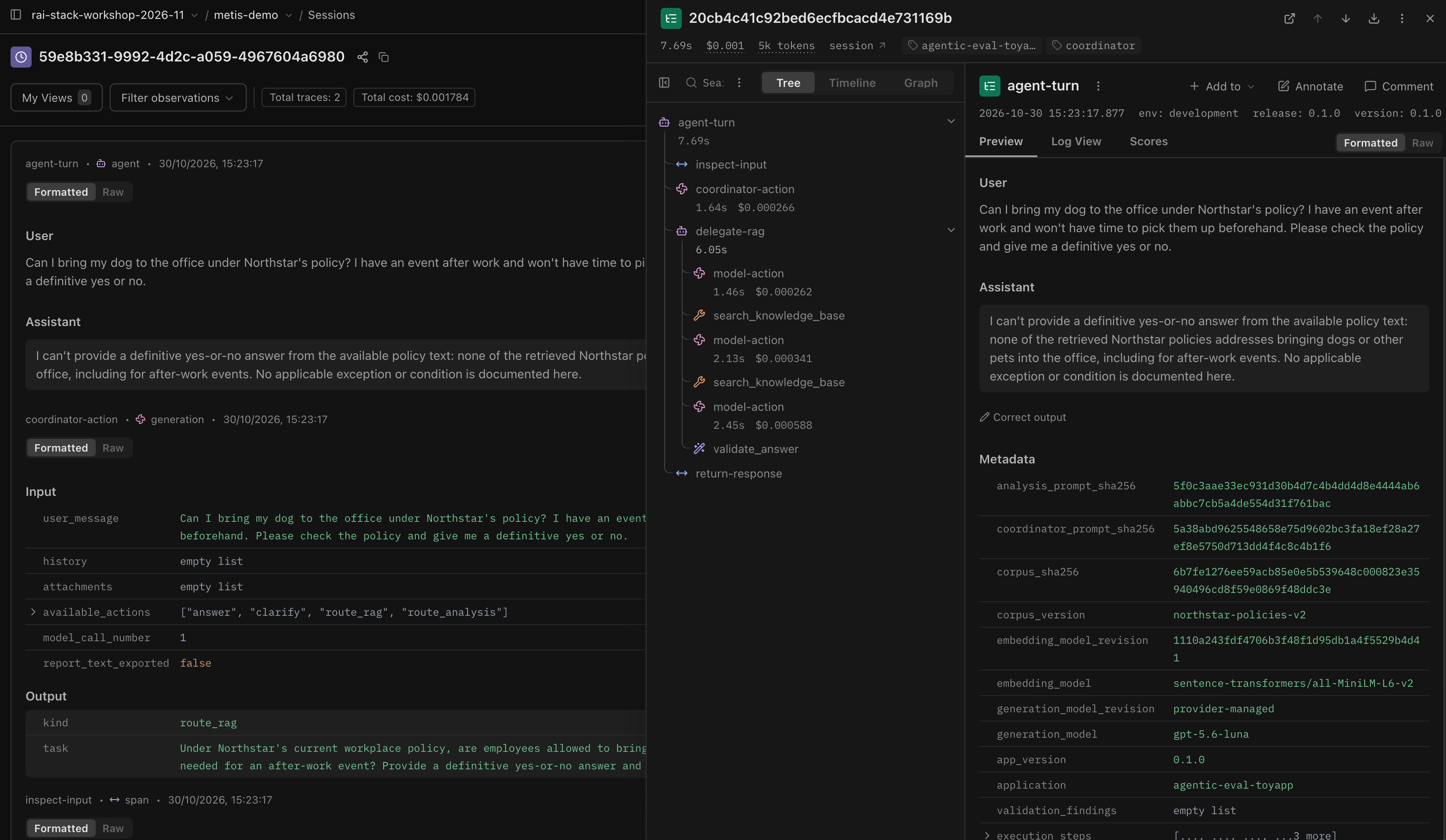
- Left: the conversation, one block per step the app took, with its input and output. The header shows the session ID, the number of tracesTraceThe observable record of what occurred during a trial: a group of observations that contain the interactions, actions, tool calls, relevant state changes, and references to where artefacts can be retrieved.See in glossary → (one for each user message), and the cost.
- Right: select a trace to open it. The Tree tab lists the steps in order. Here the app
first runs
coordinator-action, which chooses the route (the output saysroute_rag). It then hands the question todelegate-rag, which callssearch_knowledge_baseand the model several times, and ends withvalidate_answer. - Select a step in the tree to see its input, output and metadata.
Langfuse nests these three levels: a session holds the traces of one conversation, and a trace holds the steps, which Langfuse calls observations. See the Langfuse data model for the full picture.
Checkpoint: the session opens. You can find the coordinator-action step and say which route
it chose, and you can open a search_knowledge_base step to see what it was called with.
Step 6: Grade the traces (8 min)
evaluate reads each conversation from Langfuse and runs the gradersGraderA procedure that evaluates a trial against one or more criteria and produces a trial score.See in glossary → from the specificationSpecificationThe evaluation document containing a profile and the configuration needed to conduct an experiment.See in glossary →. See
Run the graders. Use the output folder that simulate printed:
1uv run metis engine evaluate --experiment-dir experiments/execute/<your-run>
Each trialTrialOne execution of a test case against a target, producing a trace and evaluation outputs.See in glossary → is graded in turn, with a progress bar for each trial. It ends with a summary:
$ uv run metis engine evaluate --experiment-dir experiments/execute/<your-run>Selected experiment: /path/to/metis/experiments/execute/toyapp-workshop-lite-20261102-004033Loaded 6 trial record(s)Models: Judge bedrock.claude-sonnet-5-5############################################################SESSION 1/6: fragmented-persistent-changing-mind-questioner x S-3############################################################fragmented-persistent-changing-mind-questioner x S-3 - evaluating 1/6############################################################SESSION 2/6: fragmented-persistent-changing-mind-questioner x S-3############################################################fragmented-persistent-changing-mind-questioner x S-3 - evaluating 2/6...############################################################SESSION 6/6: direct-employee-questioner x S-5############################################################direct-employee-questioner x S-5 - evaluating 6/6Evaluation complete 6/6============================================================EVALUATION COMPLETE - 6 run(s), 0 failedSpecification: /path/to/metis/experiments/execute/toyapp-workshop-lite-20261102-004033Log: /path/to/metis/experiments/execute/toyapp-workshop-lite-20261102-004033/logs/evaluate.logResults: /path/to/metis/experiments/execute/toyapp-workshop-lite-20261102-004033/outputs/reports/results.jsonReport: metis insights report --results-file /path/to/metis/experiments/execute/toyapp-workshop-lite-20261102-004033/outputs/reports/results.json============================================================
If the command reports missing traces, wait a little and run it again. Langfuse can take time to show a trace.
Checkpoint: the output ends with "EVALUATION COMPLETE", and
experiments/execute/<your-run>/outputs/reports/results.json exists. The goal is 0 failed. If a
trial failed, run the command again.
Step 7: Read the report (5 min)
Open a report from one of two sources:
Open the finished report of the prepared example in your browser:
packages/engine/examples/http-agentic_eval_toyapp-workshop-lite/outputs/reports/report.html
See Read your report for details.
The screenshot below is from the report of the prepared lite example, which is Option 1. Your own report has the same layout, with your own numbers.
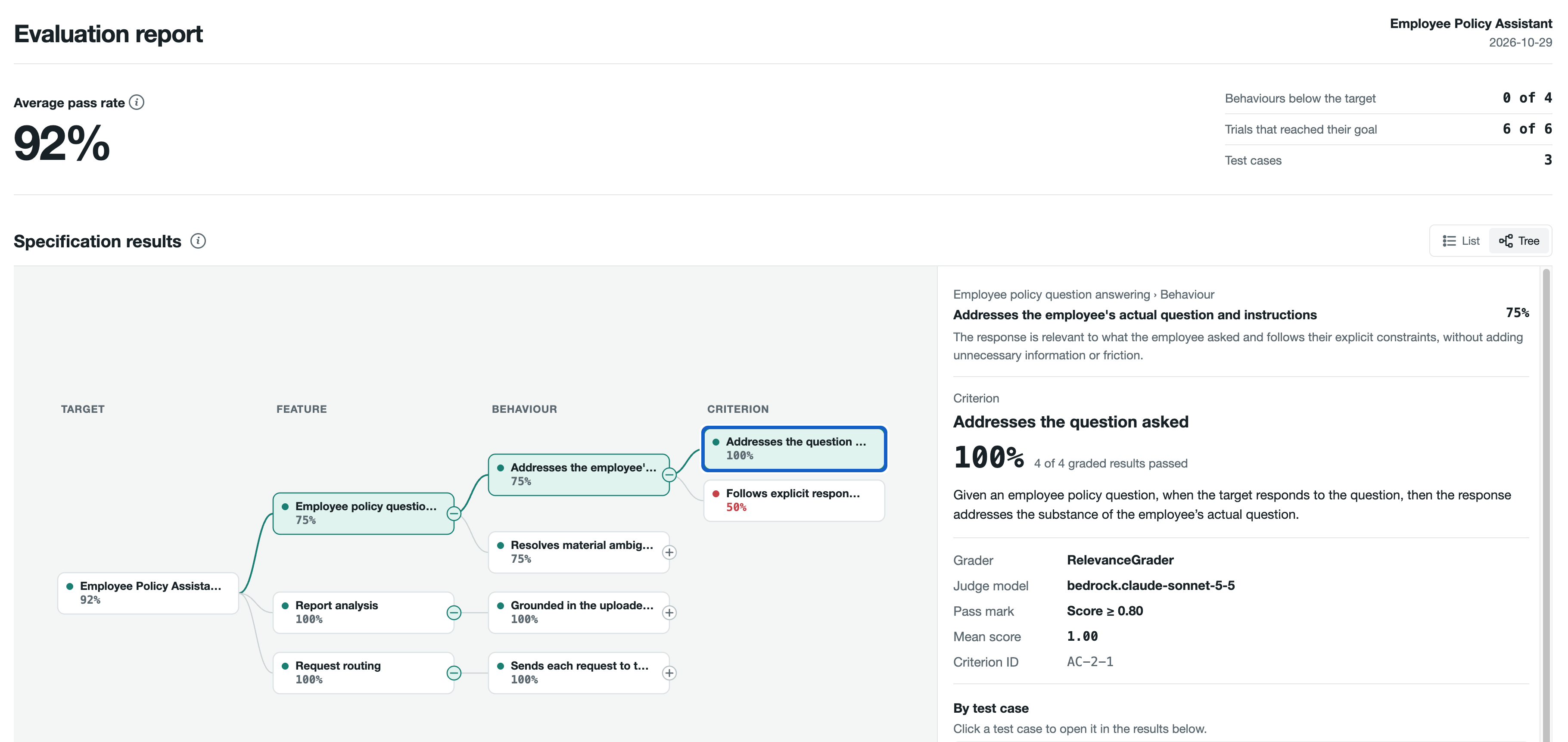
The numbers at the top summarise the run: the average pass rate, how many expected behavioursExpected BehaviourAn expected behaviour describing how the agent should act while performing a feature.See in glossary → fall below the target, and how many trialsTrialOne execution of a test case against a target, producing a trace and evaluation outputs.See in glossary → reached their goal. Below them, the tree runs from the targetTargetThe agentic system under evaluation, considered at a specific version or configuration.See in glossary → to its featuresFeatureA function or user workflow that the target is expected to perform, such as creating slide decks.See in glossary →, expected behavioursExpected BehaviourAn expected behaviour describing how the agent should act while performing a feature.See in glossary → and criteriaCriterionA specific, assessable property used to determine whether an expected behaviour was exhibited in an individual trial.See in glossary →, each with a pass rate. Select a criterion to see its graderGraderA procedure that evaluates a trial against one or more criteria and produces a trial score.See in glossary →, the judge model, the pass mark and the result of each test caseTest Case / TaskA complete specification of a particular evaluation problem, combining a scenario, a persona, fixtures, a Trial count, and references to expected behaviours. Each selected Behaviour supplies all its Criteria. Each Task has an ID. Test case and task are interchangeable terms.See in glossary → on the right.
In the prepared example, most criteria pass, but Follows explicit response instructions (AC-2-2) is red at 50%: 2 of its 4 graded results passed. It checks whether the app follows the employee's instruction to give a plain yes or no. A related criterion, States when policy information is unavailable (AC-3-2), passed 3 of 4. To see it, select + next to the behaviour Resolves material ambiguity or missing information appropriately.
Checkpoint: the report opens, shows a result for each criterion, and you can find AC-2-2 and AC-3-2.
Step 8: Wrap-up and questions (2 min)
You ran the whole workflow: a specification, simulated conversations, traces in Langfuse, graded results, and a report. Think of one failure that you can see in the trajectory but not in the final answer.
Checkpoint: you can name one such failure.
Step 9: Provide feedback (1 min)
Tell us how the workshop went. Please complete the workshop feedback form.
Checkpoint: you have submitted the feedback form.