Target connection
The Target connection tells the Engine how to reach your Target. METIS saves it as
target-binding.yaml, next to specification.yaml. You only need it if you wish to run your
evaluations against the Target.
Why connect your Target
The specification defines what to test in the Target system, and how. The Engine needs to connect to your Target to simulate a user interaction on your real application. A runner carries each message to the Target and reads the reply, and the Engine records every step for the Graders.
Connection Options
| HTTP API | Browser | |
|---|---|---|
| Choose it if | Your Target has an API with an OpenAPI description | Users reach your Target only through a web page |
| How the runner reaches it | It calls the API endpoints that the OpenAPI description lists | It opens the page, then clicks and types like a user |
| What you give | The OpenAPI URL and the API key variable | The start page URL and the sign-in steps |
| What you can also set | The calls that send a message, the calls to refuse, and secret headers | The variables that the sign-in steps use |
We recommend HTTP API as it is faster and more stable.
Connect in the browser
Choose Build Spec and connect target, fill in the Target connection card, then select Test connection.
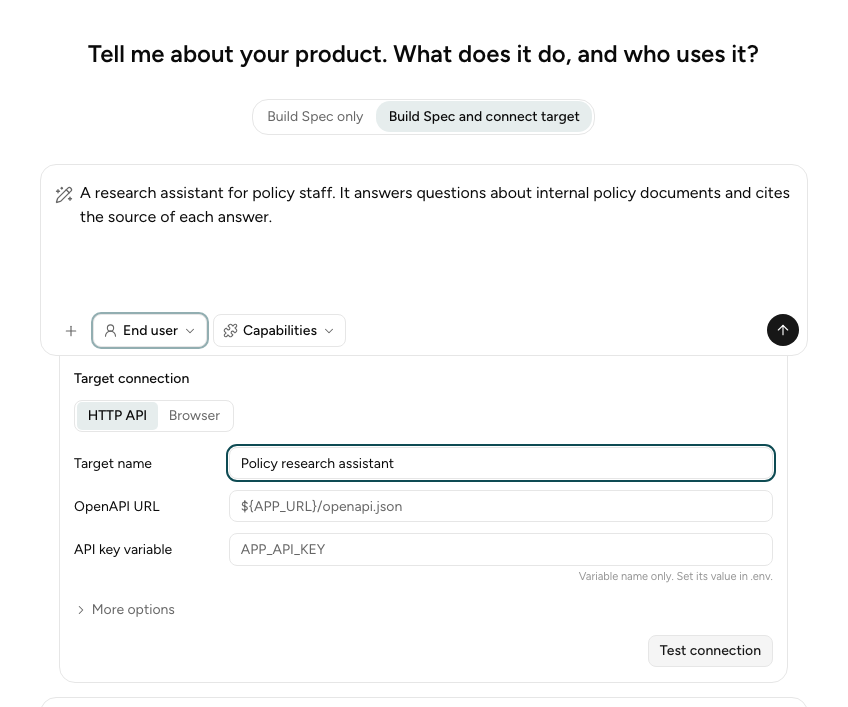
You may also connect after the interview with Connect target. In the CLI, choose Build Spec
and Run Evals (connect the target), or run metis wizard connect --out-dir <folder> later.
Keep secrets in .env
Type only the name of each secret, such as APP_API_KEY, and set its value in .env:
APP_URL=https://policy-assistant.example.com
APP_API_KEY=your-api-key
The Engine fills in each ${NAME} from .env when it runs.
Write the file yourself
Put target-binding.yaml next to specification.yaml, and set target_binding: target-binding.yaml in the specification. See
Choose the runner.
- HTTP API
- Browser
schema_version: 1
identity:
  name: Policy research assistant
transport: http
spec_url: ${APP_URL}/openapi.json
auth:
  secret_env: APP_API_KEY
submissions:
- POST /chat
forbidden_calls:
- DELETE /**
schema_version: 1
identity:
  name: Policy research assistant
transport: browser
start_url: ${APP_URL}/login
login:
  note: Type {{secret:APP_USER}} in the email box and {{secret:APP_PASSWORD}} in the password box. Select Sign in.
  secrets: [APP_USER, APP_PASSWORD]
The JSON schema is in
target-binding.schema.json.
Field reference
Browser field is the matching field in the Target connection card.
Both transports
| Field | Browser field | Meaning |
|---|---|---|
schema_version | None | Always 1. Required. |
identity.name | Target name | The name of the application. Required. |
identity.version | None | The version of the application. |
transport | HTTP API or Browser | http or browser. Required. |
advice.notes | Runner notes | Advice for the runner, for example "The chat replies after a few seconds." |
advice.limits | None | The rate limits of the application: submit_per_minute, read_per_minute, and a note. |
HTTP API
| Field | Browser field | Meaning |
|---|---|---|
spec_url | OpenAPI URL | The address of the OpenAPI description. Required. |
auth.secret_env | API key variable | The variable that holds the API key. The Engine uses the security scheme that the OpenAPI description declares. |
submissions | Submissions | The calls that send the user's message. If you leave it empty, the Engine uses any POST, PUT, or PATCH call with a JSON body. |
forbidden_calls | Refused calls | The calls that the Engine never sends. |
secret_headers | Secret headers | Headers that the Engine adds to matching calls. Each one has a match call, a header name, and the env variable of its value. |
tls_verify | Verify the TLS certificate | false to skip the certificate check. Default true. |
preflight_reads | None | Paths that the Engine reads before each Trial. A failed read is a warning only. |
Write a call as a method and a path, for example POST /chat. In the path, * matches one part,
and ** matches any number of parts. DELETE /** matches every DELETE call.
Browser
| Field | Browser field | Meaning |
|---|---|---|
start_url | Start page URL | The page that the browser opens first. Required. |
login.note | Sign-in steps | How to sign in, in plain words. Write {{secret:NAME}} where a secret is typed. |
login.secrets | Sign-in variables | Each variable that the sign-in steps use. |
Next step
Go back to the guided interview, or run your evaluations.