Start the interview
In the guided interview, you describe your application and the Wizard drafts the tests.
1. Start the Wizard
- Browser
- CLI
In your editor, open a terminal in the repository folder and start the Wizard:
1make run-web
Each line of output starts with the name of its server, api or web. Keep the terminal open.
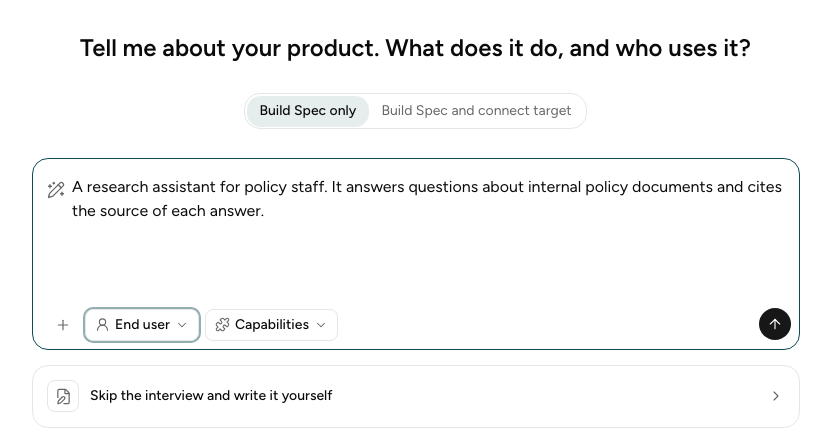
Open the address that the web lines show, for example http://localhost:5173. You see the
opening screen:
Open a terminal in the repository folder and run:
1metis wizard init
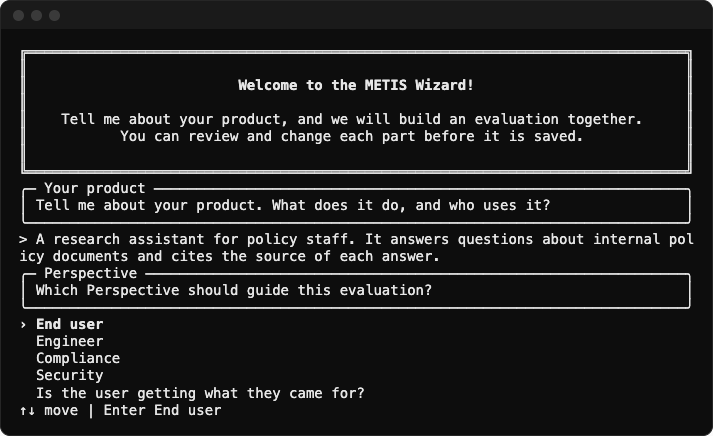
To add documents, give --document once for each file, for example
metis wizard init --document policy.pdf. You see the opening screen:
2. Build Spec and/or Connect Target
Above the text box, choose:
- Build Spec only if you only wish to generate the
specification.yaml - Build Spec and connect target if you wish to generate both the
specification.yamland the Target connection.
3. Describe your Target
Type a short description. Say what the application does and who uses it:
A research assistant for policy staff. It answers questions about internal policy documents and cites the source of each answer.
You may also upload documents. They help the Wizard build more representative specifications.
4. Choose the Perspective
The Perspective says who the evaluation is for. End user is the default.
| Perspective | Guiding question |
|---|---|
| End user | Is the user getting what they came for? |
| Engineer | Is the agent performing as intended, correctly and efficiently? |
| Compliance | Are our responses audited, grounded, and within compliance policy scope? |
| Security | Is our target safe against malicious attacks? |
5. Select Capabilities
Select Capabilities to tell the Wizard what your application can do, such as Tool Use or File & Data Management. Under Confidence, say how sure you are that the list is complete. This step is optional. If you skip it, the capabilities stay unspecified.
6. Run the Interview
The Profile opens once you start the Interview. There are a few key steps you will go through to complete your specification.
| Step | You do this |
|---|---|
| Define product requirements | |
| 1. Understanding your target | Answer the Wizard's questions |
| 2. Features / Expected Behaviours | Choose what to measure |
| 3. Acceptance criteria | Check each Criterion and its grader |
| Design Test Cases | |
| 4. Personas | Check the simulated users |
| 5. Scenarios | Check the situations to test |
| 6. Test Cases | Choose the tests to run, then download |
The browser saves each interview. To open one again, select it in the list on the left.
